










Your account name is the one field every tool reads to find the company behind a record: the enrichment search, the duplicate check, the lead router, and now the AI agent. When the name describes a warehouse, a billing instruction or a person instead of the company, all of them miss.
We work on account data every day, and the same things turn up in almost every CRM we open. Next to the company, the name carries:
- a site or a store:
DC #123,- Headquarters,Plant 3, a city and state - an address instead of a company:
15 Harbor Street LLC - a second company: the legal entity behind a trading name, a manager after “c/o”, a parent in brackets
- a note for finance or the ERP:
**PREPAY**,ATTN: AP1234,***DO NOT USE*** - a person: a sole trader’s own name, an employee’s account
- broken text:
?where an accented letter was, a name cut at 40 characters, an internal acronym
Each of them sends the website search, the duplicate check and the agent looking for something other than the company. When an account finds no match, the name is the first thing we check, and more often than not it is the cause. No data provider, however good, can find a company the name does not describe.
The fix costs nothing but discipline: a naming convention. Below, what goes wrong, what it costs, and two conventions that work, one simple and one structured.
Anatomy of a messy account name
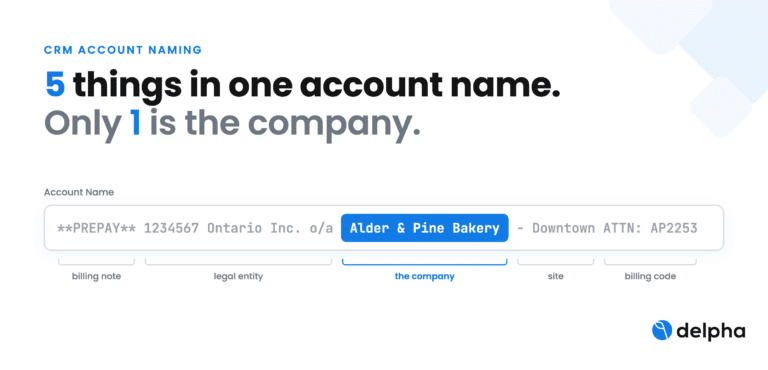
A typical account name carries the company and four other things: a payment note, the legal entity, a site and an invoice code. A search engine cannot tell them apart, so it searches all of them at once.

Move everything that is not the company into the brackets and the search reads the company alone, while people keep every detail.
What a bad account name costs
A messy name does not fail once; it fails in every system that reads it. Gartner puts the cost of poor data at $12.9 million a year for the average organization, and the account name is one of the cheapest places to cut it.
| Impact | What happens | What it looks like |
|---|---|---|
| Enrichment misses | The search for the website, legal ID or company page runs on the name. A site, an address or a note in it sends the search somewhere else. | ×2 risk of missing the company or landing on the wrong one when the name carries a store number, a site or an address. |
| Duplicates survive | Duplicate rules compare names; the noise around the company keeps the same customer apart as three records. | ACME CORP, Acme Corporation - HQ and *PREPAY* Acme Corp |
| Hierarchies break | A site named like a company cannot roll up to its group; a parent hidden after “c/o” or “dba” is never linked. Territory, cross-sell and wallet share are computed per fragment. | Kestrel Tower LP c/o Brightwell Property Management: the manager exists only as text, so neither account points to the other. |
| Routing and reporting split | Lead-to-account matching and territory rules key on the name; reports group by it. One customer shows up as several. | A distribution center routed to a different rep than its parent company. |
| Credits and hours wasted | Enrichment and steward time go to records that can never match: internal accounts, people, buildings. | 4 in 10 accounts with no website should never have been searched: people, buildings, numbered companies, test or internal accounts. |
| AI agents act on the wrong company | An agent reads the name literally. It treats “DO NOT USE” as part of a company name, or merges Bolt in San Francisco with Bolt in Estonia because only the name was compared. | We call this structural hallucination: the model reasons correctly over a record that is wrong. |
What we find in account names
Every CRM has its own habits, but the same kinds of information keep ending up in the Account Name field. Each one is useful to someone; none of it is the company. With the simple convention below, all of it goes in the brackets; with the advanced one, each gets its own place.
| What we find | Example | What goes wrong | Where it goes (advanced) |
|---|---|---|---|
| Site, store or plant | DC #123, Plant 3, - Headquarters |
The search looks for a warehouse, not the company | Site |
| City, region or country | Corvane Foods Dallas TX, - Montreal |
Glued to the name, the city reads as part of it; branches split into separate companies | City, Country |
| Street address | 15 Harbor Street LLC, 1234 Main St - Suite 1 |
The search gets an address, not a name | Billing or shipping address |
| Building or property | Kestrel Tower, Harbour Plaza Phase II |
A building has no website; every search is wasted | Not searched; linked to its owner or manager |
| Legal entity behind a trading name | 1234567 Ontario Inc. o/a Alder & Pine Bakery, dba, t/a |
Two companies in one name, searched as one | Legal entity |
| Numbered or holding company | 9999-1234 Québec inc., Kestrel Tower Holdings LP |
Nothing to find on the web; the search should not run | Legal entity; not searched |
| Former or other name | formerly Halvorsen Electric, f/k/a, aka |
Old and new names searched together | Previous name |
| Manager, agent or payer | c/o Brightwell Property Management, as agent for, ITF |
Which company is the customer depends on who reads it | Related account |
| Parent or brand | Halvorsen - a Corvane company, Corvane Group / Halvorsen |
The group link exists only as text, so nothing rolls up | Parent account |
| Department or team | Facilities Dept, IT Procurement, Marketing EMEA |
Each team becomes a company of its own | Department |
| A person | MARCHAND JEAN, Dr. A. Landvast |
A person’s name gives the search nothing to match | Contact, with the trading name as account name |
| Internal account | TEST ACCOUNT, Template - do not edit, an employee, a job code |
Credits and steward time spent on records that are not customers | Record type; not searched |
| Status | ***DO NOT USE***, CLOSED, USE 123456, LOCKED |
An agent reads it as part of the name; the pointer to the replacement account is lost in free text | Status |
| Billing or payment note | **PREPAY**, ATTN: AP1234, CREDIT HOLD |
Finance instructions read as the company | Payment terms, credit status |
| Codes and identifiers | #00123, SAP 1234, (NO SAP), CUST-01234 |
Numbers match nothing and keep duplicates apart | External ID, ERP number |
| Acronym or nickname | NMC, CORV-TX |
Only your team knows what it stands for | Short name |
| Truncated name | Northwind Mechanical Contractors Associa |
The search gets half a name | Nowhere: restore the full name |
| Broken or extra characters | Caf? du Port, ***, stray -, ; or / |
A ? where an accent was changes the word; duplicates differ by one character | Nowhere: clean it once |
Not all of it hurts the same way. The damage comes from text that stands in for the company or competes with it: an address, a site, a code, a manager, a note. A legal form at the end of the name only describes the company’s paperwork and barely gets in the way. And some accounts will find nothing even with a perfect name: numbered companies, buildings, joint ventures, people. They need a different route, not a better search.
Recommendation 1, simple: Company name (everything else)
Keep the company’s own name outside the brackets and put everything else inside, separated by commas. A simple regex drops the bracketed text, so any search, duplicate rule or agent sees the company alone, while people still see the context.
- Outside the brackets: the name the company uses on its own website. Keep the legal form if you use one. Nothing else.
- Inside one bracket group at the end: everything else. Site, city, country, store number, department, status, billing note, the legal entity behind a trading name, the manager after “c/o”, in the order they came, separated by commas.
- One bracket group, always last. A second group in the middle of the name splits it for the search.
- Never hide the only usable name in the brackets. When the stored name is a person and the brackets hold the business, swap them.
- Nothing to add, no brackets. A clean name stays as it is.
| Before | After |
|---|---|
| Corvane Foods DC #123 Dallas, TX | Corvane Foods (DC #123 Dallas, TX) |
| Halvorsen Electronics, Inc. – Headquarters | Halvorsen Electronics, Inc. (Headquarters) |
| ***DO NOT USE – USE 012345*** Landvast Health Clinic | Landvast Health Clinic (DO NOT USE, USE 012345) |
| 1234567 Ontario Inc. o/a Alder & Pine Bakery | Alder & Pine Bakery (1234567 Ontario Inc. o/a) |
| Kestrel Tower LP c/o Brightwell Property Management | Kestrel Tower LP (c/o Brightwell Property Management) |
| MARCHAND JEAN (MARCHAND ELEC) | MARCHAND ELEC (MARCHAND JEAN) |
The limit: brackets are free text. People can read them, but no report, filter or rule can use what is inside.
Recommendation 2, advanced: every fact in its own field, the name built from them
Store each piece of information once, in its own field, and let the system write the name: Company name (Site, City, Country). People still read one line, and every report, rule and agent can use the pieces directly.

- Build the name on save, never by hand. In Salesforce the standard Account Name cannot be a formula, so a record-triggered flow sets it from the fields and rebuilds it whenever one changes.
- Pick the parts that tell accounts apart. Site and city for multi-site customers, country for international groups. With the country in the name, Bolt in San Francisco and Bolt in Estonia stop being merged as one company.
- Keep status, risk and money out of the name. Account status, credit risk, payment terms, legal entity and parent account are fields that rules and agents can filter on; in the name they are noise.
- Lock the company name field to the name the company uses on its own website. It is the one part every search reads.
Simple or advanced: which one to choose
Start simple; move to structured fields wherever reports, routing or agents need the details.
| Simple: Name (everything else) | Advanced: fields, name built from them | |
|---|---|---|
| To adopt | A naming rule and a validation check | New fields, a formula or flow, a one-time migration |
| What the search sees | The company name alone | The company name alone |
| Report, route or filter on site, country, status | No: it is free text | Yes: each item is a field |
| Consistency | Depends on who types the name | Built by the system, the same every time |
| Best for | A first clean-up, small teams, systems you cannot change | Multi-site customers, several source systems, AI agents acting on the record |
Before you save an account:
[ ] The name is what the company calls itself on its own website
[ ] Everything else sits in one bracket group at the end, separated by commas
[ ] No status word, billing code, “dba” or “c/o” outside the brackets
[ ] A site rolls up to its company through the parent account, not through the name
[ ] Billing country is filled, and at least one contact has a company email domain
[ ] A validation rule flags “#”, ” – “, “dba”, “c/o”, asterisks and site words outside the brackets
[ ] A renamed account is checked against the website already confirmed for it
FAQ
What is an account naming convention?
A rule for what goes in the Account Name field of your CRM, so every record names the company the same way and puts everything else in the same place.
Should the account name include the city or the site?
Only in brackets after the company name, or in its own field. Written into the name itself, a store number, a distribution center or an appended city at least doubles the risk that the website search misses.
Should I keep the legal form (Inc., Ltd, GmbH)?
You can. Delpha’s search drops a trailing legal form, and in our data it barely moved the miss rate. What gets in the way is text after the legal form, such as “- Headquarters”: the legal form is no longer at the end. Put that text in the brackets.
How do I name a branch, store or plant?
As its own account named after the company, with the site in brackets or in a site field, and the company as its parent account. Reports and routing then see one customer.
What about sole traders and accounts named after a person?
Use the trading name and keep the person as a contact, or in the brackets. A person’s name gives a search nothing to match.
How do AI agents use the account name?
Literally. Whatever sits in the name, a status, a billing code, a manager, becomes part of what the agent thinks the company is. With the simple convention, tell the agent to ignore the text in brackets, or strip it before the agent reads the name with a simple regex such as \s*\([^()]*\)$. With the advanced one, give agents the clean name and the details as fields.
Can existing names be fixed automatically?
Yes, as long as the change only moves words and never invents them. Code cuts the name into pieces, a classifier picks the company name and labels the rest, code rebuilds Company name (everything else), and each rename is checked against the website already confirmed before it is written. This is how Delpha cleans account names: Delpha is the deterministic source of commercial truth for AI agents.
Improve efficiency and boost revenue with Delpha
Want to learn more about Delpha?